When an External Number profile sends a call to a mobile or another phone, two settings decide what the person answering sees and hears: the Caller ID Displayed on their screen while it rings, and an optional Whisper Soundfile played to them when they answer, before the caller is connected. Together they tell the person it's a business call before they say hello.
This guide sets both on Acme Plumbing's On-call mobile profile. If you haven't created an external number profile yet, start with Add an External Number Profile.
Caller ID options
Caller ID Displayed has three kinds of choice:
- Caller Number (default) — the caller's own number. The person answering sees who's calling and can call them back directly, but can't tell a forwarded business call from any other call from that person.
- This Phone Number — the Siptalk number the call came in on, e.g. 03 5550 1987. Save it in the mobile's contacts as "Acme Plumbing" and every forwarded call shows up by name. Not offered on 1300 and 1800 numbers.
- Custom Caller Numbers — a fixed set of Siptalk numbers (02 4080 0000, 02 9173 8522, 07 2106 5859 and others) you can show instead. They're useful when one phone takes calls from several places: give each profile a different custom number, save each in the phone's contacts with its own name and ringtone, and you know which line a call came through before you answer.
Make the whisper
The whisper is a sound file played only to the person answering, never to the caller. Keep it to 1–3 seconds — "Business call", or "Acme Plumbing call" — because the caller is kept waiting while it plays, and it plays on every call.
The quickest way to make one is text-to-speech. Go to Settings → TTS Voices, choose a voice, type the words into Text Script and click [Create Audio File]. Add an Announcement Profile walks through the TTS page in more detail.
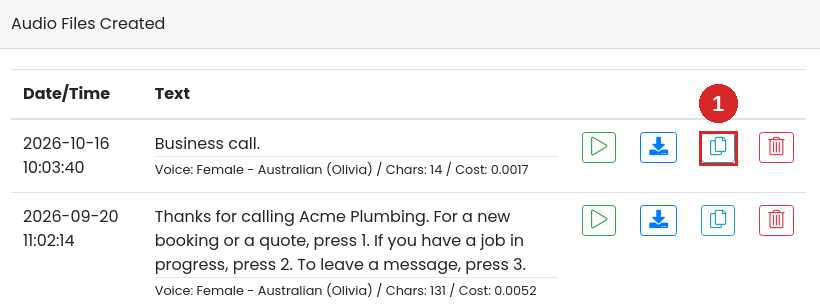
The file appears under Audio Files Created. Play it to check it, then click the copy button (1) to copy it to your sound files.
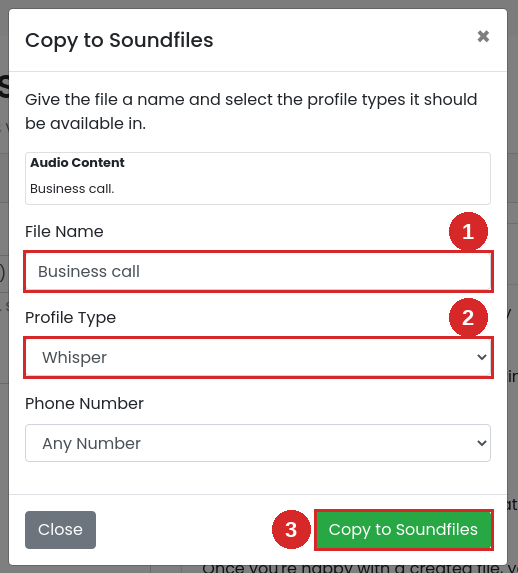
Give it a File Name (1) you'll recognise in the profile's list, set Profile Type to Whisper (2), and click [Copy to Soundfiles] (3). Leave Phone Number on Any Number to use the same whisper on profiles across all your numbers.
Set them on the profile
Go to Services → Phone Numbers, click [Manage] on the number, and click [Configure] on the external number profile.
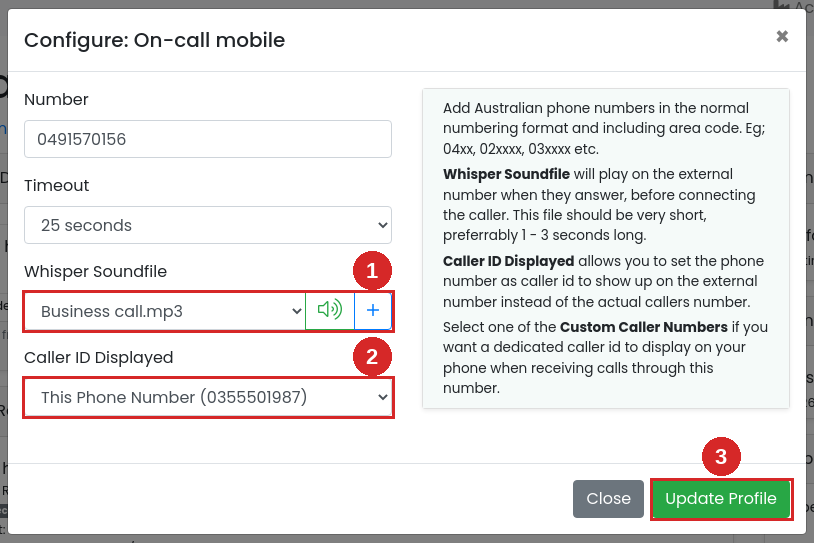
- Whisper Soundfile — choose the file you just made. The speaker button plays it so you can check it's the right one.
- Caller ID Displayed — choose Caller Number, This Phone Number, or one of the Custom Caller Numbers listed under it.
- Click [Update Profile].
The profile row now shows the whisper:

The changes apply straight away wherever the profile is already attached to a schedule. If it isn't attached yet, it doesn't take calls — see Attach it to a schedule.
What happens on a call
A customer rings 03 5550 1987 after hours. The on-call mobile rings showing 03 5550 1987 (saved as "Acme Plumbing", so the name appears). The plumber answers and hears "Business call", then is connected to the customer. The customer is kept waiting for those few seconds and never hears the whisper.
Troubleshooting
The whisper isn't in the Whisper Soundfile list
The list only shows sound files with the profile type Whisper or Any. A file copied from TTS as an Announcement or IVR file won't appear. Copy it again from Settings → TTS Voices with the profile type set to Whisper.
Callers hang up before they're connected
The whisper is too long. The caller waits while it plays, so trim it to a few words.
The mobile shows the caller's number, not the business number
Caller ID Displayed is still on Caller Number (default), or the change wasn't saved with [Update Profile]. Open Configure and check the setting.
There's no "This Phone Number" option
It isn't offered on 1300 and 1800 numbers. Choose one of the Custom Caller Numbers instead.
The person answering doesn't hear the whisper
- Check the profile row shows Whisper: with the file name. If not, the whisper wasn't saved.
- If the mobile's own voicemail answers, the whisper plays to the voicemail. Set the timeout shorter than the mobile's voicemail delay, as in Configure the profile.