An External Number profile sends calls from your Siptalk number to any other phone number — a mobile, a landline, or a phone at another business. This guide sets one up for Acme Plumbing's on-call mobile, so calls that aren't answered on the office handsets after hours ring the plumber on duty.
What an external number profile does
- It's a profile like any other. You attach it to a schedule on a number, on its own or after a ring group as an overflow. See Routing Profiles Overview if profiles are new to you.
- The caller doesn't know. They dial your business number; the call is placed to the external number in the background and the two are joined.
- The onward leg is a call you pay for, at the inbound-to-mobile or inbound-to-fixed-line rate on the rates page.
Create the profile
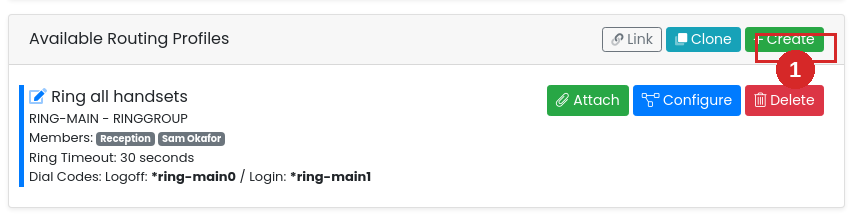
Go to Services → Phone Numbers, click [Manage] on the number, and in Available Routing Profiles click [+ Create].
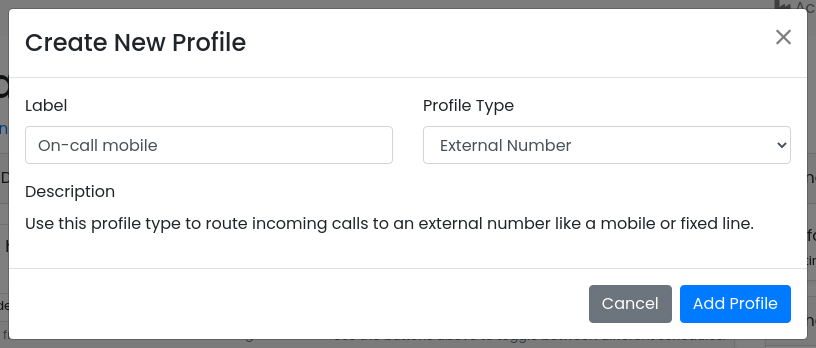
Give it a label you'll recognise in the routing list, set Profile Type to External Number, and click [Add Profile].
The new profile appears in the list with no number yet. Click [Configure] on it.

Configure the profile
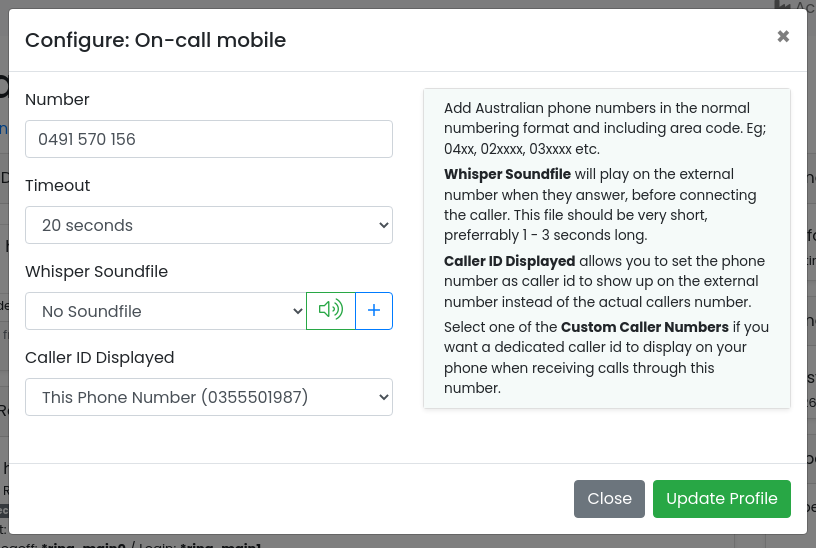
- Number — the phone number to send calls to, in normal Australian format with the area code: 04xx xxx xxx for a mobile, 02 / 03 / 07 / 08 for a landline. Spaces are fine.
- Timeout — how long to ring the external number before giving up and moving to the next profile in the schedule. See the note below.
- Whisper Soundfile — optional. A short recording played to the person answering the external number, before the caller is connected — "Call for Acme Plumbing", for example, so they know to answer in the business's name. Keep it to a second or two; it plays every time.
- Caller ID Displayed — what shows on the external phone's screen when it rings:
- Caller Number — the caller's own number. The person answering can see who's calling and call them back directly.
- This Phone Number — your business number. Every call from the system is recognisable, and the person can give it a different ringtone or answer it differently. Not available on 1300 and 1800 numbers.
- Custom Caller Numbers — a dedicated number that shows only for calls through this profile, if you want to tell them apart from calls through others.
Click [Update Profile].
The profile row now shows the number and timeout:

Attach it to a schedule
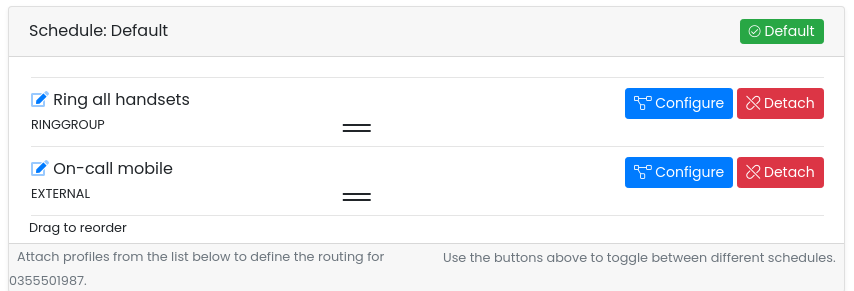
Select the schedule the profile belongs on using the buttons at the top of the page — in this example Default, which handles after-hours calls — and click [Attach] on the profile.
The profile joins the schedule's list. Calls work through that list top to bottom, so put the external number where you want it: after a ring group if it should only ring when the office doesn't answer, or on its own if every call on that schedule should go straight out. Drag the rows to reorder them.
What happens on a call
With the setup above, an after-hours call to 03 5550 1987 rings the office handsets for the ring group's timeout. If nobody answers, the on-call mobile rings for 20 seconds, showing the business number as caller ID. If the mobile is answered, the plumber hears the whisper (if one is set) and is then connected to the caller. If not, the call moves to whatever comes next in the schedule — usually a voicemail profile.
Troubleshooting
"Profile not saved" when configuring
The number you entered is the same as the number you're configuring. That would send the call round in a loop, so the portal refuses it. Enter the destination phone number instead.

The mobile doesn't ring
- Check the profile is attached to the schedule that's active right now, and that it isn't sitting below a profile that never gives up the call (a voicemail profile, for instance).
- Check the number: Australian format with the area code, no country code.
- If a ring group is ahead of it, the mobile only rings after the ring group's timeout expires.
Calls go to the mobile's voicemail
The timeout is longer than the mobile's own voicemail delay. Reduce it — see the warning under Configure the profile.
The person answering doesn't know it's a business call
Set Caller ID Displayed to This Phone Number so business calls are recognisable, or add a short Whisper Soundfile that announces the call before it's connected.